
During a home renovation, HDMI wiring is often planned together with power outlets, TV walls, cabinets, ceilings, and projector mounts. It may look like a simple cable decision, but once the wall is sealed, changing that cable becomes expensive, messy, and sometimes impossible without damaging the finished interior.
This is why in-wall HDMI prewiring should not be treated like a temporary accessory purchase. It is part of the long-term audiovisual infrastructure of the room. Whether the display is a living-room TV, a home theater projector, a gaming monitor, or a conference-room screen, the HDMI cable must remain stable across years of device upgrades.
For most hidden installations, a fiber optic HDMI cable is a more reliable choice than a conventional copper HDMI cable, especially when the cable route is longer than a typical short desktop connection.
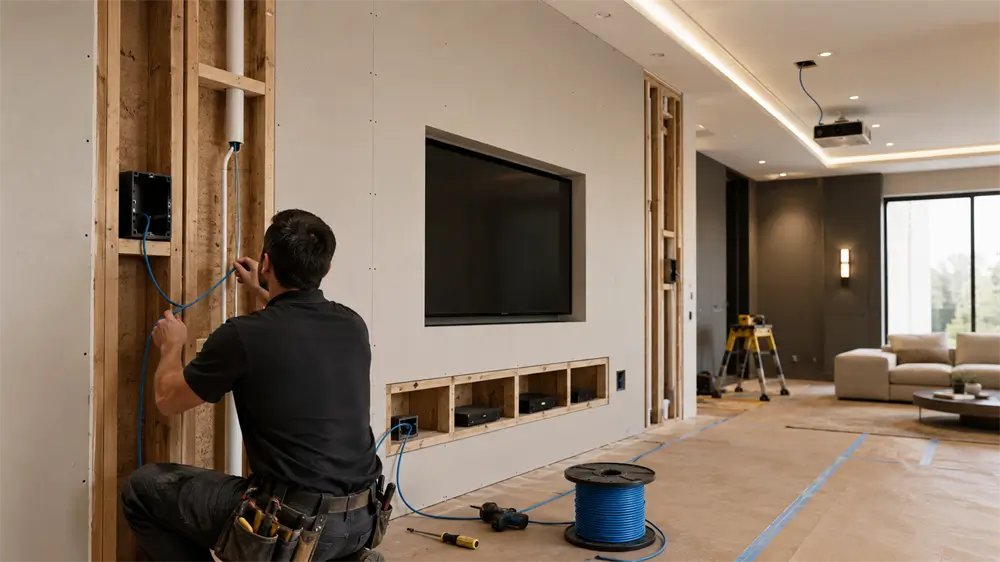
Why Copper HDMI Becomes Risky in Long Hidden Runs
Traditional copper HDMI cables are widely used for short connections between a TV and a set-top box, laptop, game console, or Blu-ray player. At short distances, a good copper cable can perform well. The problem appears when the cable must pass through walls, cabinets, floors, ceilings, or projector routes.
As the distance increases, copper HDMI is more vulnerable to signal attenuation, electromagnetic interference, and unstable high-bandwidth transmission. Symptoms may include a black screen, flickering, random signal loss, no audio, incorrect resolution, or failure to achieve 4K or 8K output.
For exposed cables, replacement is simple. For pre-installed hidden wiring, the replacement cost is much higher. This makes cable selection before renovation more important than cable price alone.
Why Fiber Optic HDMI Is Better for In-Wall Installation
A fiber optic HDMI cable converts electrical HDMI signals into optical signals for transmission through fiber. This structure gives it several practical advantages in renovation projects.
First, fiber optic HDMI is more suitable for long-distance transmission. It can maintain signal quality over longer cable runs where passive copper HDMI may struggle. This is especially useful for projector installations, TV walls with equipment cabinets, and commercial display systems.
Second, fiber optic HDMI is better for high-bandwidth video formats. Modern AV devices increasingly require 4K, 8K, HDR, high refresh rates, eARC, VRR, and other demanding features. A higher-spec cable installed during renovation provides more room for future upgrades.
Third, fiber optic HDMI cables are generally thinner and lighter than thick long copper cables, making them easier to route through conduit. This is useful when the cable must pass through curved wall paths, ceiling spaces, or narrow equipment openings.
Fourth, optical transmission helps reduce electromagnetic interference. In real renovation environments, HDMI cables may be routed near power cables, network cables, lighting systems, speakers, or smart-home wiring. Better signal immunity helps maintain stable video and audio output.
Best Practices for HDMI Prewiring
1. Prewire Two HDMI Cables When Possible
For important in-wall routes, it is wise to install two HDMI cables: one main cable and one backup cable. If the primary cable is damaged during construction, pulled too hard, bent beyond its limit, or fails after years of use, the backup cable can be used without reopening the wall.
This small upfront cost can prevent a major repair later. For TV walls, projectors, and premium home theater rooms, backup cabling is a practical engineering habit.
2. Use Protective Conduit
HDMI cables should not be buried directly in cement, plaster, or decorative wall panels. A PVC conduit or corrugated conduit helps protect the cable from pressure, sharp edges, moisture, and construction damage.
A conduit also makes future maintenance easier. If the cable needs to be replaced, a properly sized conduit provides a path for cable pulling. The conduit should not be too narrow; it must allow the HDMI connector or pull head to pass through smoothly.
3. Avoid Excessive Bending and Pulling
Fiber optic HDMI cables are flexible, but they should still be treated carefully. Avoid tight bends, hard pulling, twisting, crushing, and stapling. A bend radius of at least 50mm is a practical reference for many installation scenarios, but the final standard should follow the specific cable’s specification.
During construction, the cable head should be protected from dust, paint, impact, and bending stress. Connector damage is one of the most common causes of HDMI failure after renovation.
4. Pay Attention to Source and Display Direction
Many fiber optic HDMI cables are directional. One end is marked “Source,” and the other end is marked “Display.”
The Source end connects to devices such as a set-top box, computer, AV receiver, media player, or game console. The Display end connects to a TV, monitor, or projector.
This direction must be confirmed before the wall is sealed. Installers should label both ends clearly. A reversed active optical HDMI cable may not output any image, even if the cable itself is not damaged.
5. Choose an In-Wall Rated Cable Where Required
For installations inside walls or ceilings, local electrical and building codes may require cables with appropriate fire-safety ratings, such as CL2 or CL3. Requirements vary by region, building type, and inspection standard, so the installer should confirm the local code before purchase.
For professional AV projects, code compliance is not optional. A suitable in-wall rated HDMI cable improves safety and reduces project risk.
Recommended HDMI Lengths for Common Renovation Scenarios
For a TV wall, the HDMI cable often runs from the TV mounting position to a TV cabinet, media cabinet, or equipment box. Connected devices may include a set-top box, NAS, game console, AV receiver, soundbar, or mini PC. A recommended prewiring length is usually 10–15 meters, with reasonable extra length reserved for routing and future device position changes.
For a projector, the cable route is usually longer. It may run from an AV cabinet to the ceiling, then across the room to the projector mount. A recommended length is often 15–20 meters, depending on the actual route. The final length should be measured along the real cable path, not only the straight-line distance between the devices.
Leaving a small margin is important, but excessive unused length should also be avoided. Too much coiled cable can make cable management difficult and may create unnecessary stress inside the cabinet or ceiling.
Common Mistakes to Avoid
The first mistake is choosing a cable only by price. In-wall HDMI is not easy to replace, so reliability should come before short-term savings.
The second mistake is ignoring future device upgrades. A cable that works for 1080p today may not support 4K120, 8K, HDR, or advanced gaming features tomorrow.
The third mistake is forgetting the cable direction. Directional fiber optic HDMI cables must be installed correctly before the wall is closed.
The fourth mistake is using no conduit. Direct burial makes maintenance difficult and increases the risk of construction damage.
The fifth mistake is failing to test before sealing. Every HDMI cable should be tested with real devices before final wall finishing.
Why Choose VCOM Fiber Optic HDMI Solutions
VCOM provides HDMI cable solutions for home theater, gaming, display engineering, commercial AV, and long-distance transmission scenarios. For renovation prewiring, VCOM fiber optic HDMI cables are designed to support stable signal transmission over longer distances while helping users prepare for high-resolution display upgrades.
For installers, system integrators, and homeowners, selecting a reliable HDMI cable brand helps reduce troubleshooting time and long-term maintenance cost. When the cable will remain hidden inside a wall or ceiling, product quality, construction planning, and correct installation are all equally important.
FAQ
Is fiber optic HDMI necessary for every TV setup?
Not always. For short exposed connections, a certified copper HDMI cable may be enough. For long in-wall routes, projector installations, or future-proof renovation projects, fiber optic HDMI is usually the safer option.
Can fiber optic HDMI support 4K and 8K?
Yes, if the cable specification supports the required bandwidth and resolution. Always match the cable to the display, source device, and target refresh rate.
Can a fiber optic HDMI cable be installed backward?
Many active optical HDMI cables are directional. The Source end must connect to the signal source, and the Display end must connect to the screen.
Should HDMI cables be installed inside conduit?
Yes. Conduit protects the cable and improves future serviceability, especially in hidden wall and ceiling routes.
How long should an in-wall HDMI cable be for a projector?
Many projector installations require 15–20 meters, but the final length should be measured according to the actual cable path.
Tag:HDMI


