
USB4, Thunderbolt 4, Thunderbolt 5, and USB-C often appear together on laptops, docks, monitors, and external SSDs. That creates an understandable question: are Thunderbolt and USB the same technology?
They are not the same, but they are now closely connected. USB is the broad, universal interface family used across consumer electronics. Thunderbolt is a performance-focused connectivity platform developed by Intel and designed to combine high-speed data, video, PCIe traffic, and power through one connection. The source material captures the practical distinction well: USB emphasizes universal adoption, while Thunderbolt emphasizes guaranteed high performance.
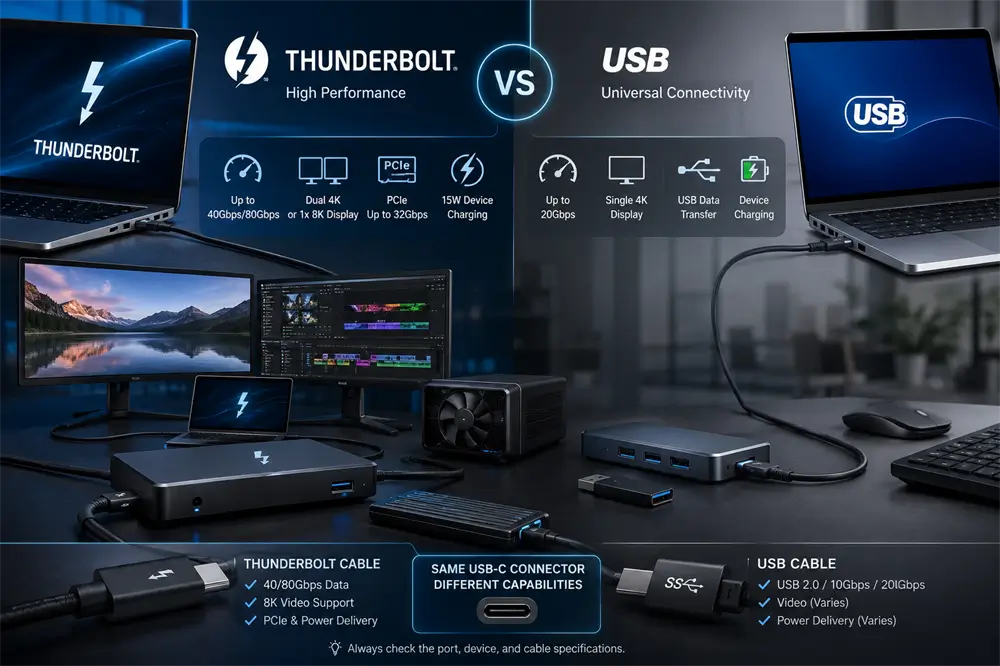
USB and Thunderbolt Are Different Standards
USB, or Universal Serial Bus, was created to provide a common way to connect peripherals and transfer data. Depending on the device and specification, USB can support keyboards, mice, storage, charging, networking, and display output.
Thunderbolt was designed for more demanding workflows. It can carry several types of traffic through one link, including USB data, DisplayPort video, and PCI Express communication. That makes it especially useful for professional docking stations, high-speed external SSDs, multi-monitor workstations, capture devices, and other bandwidth-intensive equipment.
The simplest explanation is this: USB is a flexible mass-market standard, while Thunderbolt is a certified high-performance platform with stricter minimum requirements.
Why Do They Use the Same USB-C Connector?
Modern USB4 and Thunderbolt connections both use the reversible USB Type-C connector. However, USB-C describes the physical plug and receptacle—not the complete performance level.
A USB-C port may support only USB 2.0 data and charging. Another may support USB 10Gbps, DisplayPort Alt Mode, USB4, or Thunderbolt. Cables also differ in supported speed, video capability, and power rating. USB-IF specifically advises users that cables with identical connectors do not necessarily provide identical capabilities.
Therefore, the shape of the port cannot confirm its functions. Buyers should check the device specifications, port symbols, supported protocol, maximum data rate, display capability, and charging wattage.
How Did Thunderbolt Influence USB4?
The relationship became much closer when Intel contributed the Thunderbolt protocol specification to the USB Promoter Group. According to USB-IF, the USB4 architecture is based on the contributed Thunderbolt protocol and can dynamically share a high-speed connection among data and display traffic.
This is why USB4 and Thunderbolt 4 can appear similar in real-world use. Both can carry multiple protocols through USB-C, support fast external storage and displays, and provide connections operating at up to 40Gbps.
However, USB4 permits several performance levels and product configurations. Thunderbolt certification requires manufacturers to meet a more consistent set of performance and compatibility standards.
USB4 vs Thunderbolt 4
Feature | USB4 | Thunderbolt 4 |
Connector | USB-C | USB-C |
Available performance | USB 20Gbps or USB 40Gbps | 40Gbps |
Minimum guaranteed features | Varies by product | Defined by certification |
Display support | Depends on host implementation | Two 4K displays or one 8K display |
PCIe data capability | Product-dependent | At least 32Gbps |
Common applications | General computers and accessories | Premium docks, storage, and workstations |
USB-IF recognizes USB4 products operating at 20Gbps and 40Gbps, while Thunderbolt 4 consistently operates at 40Gbps. Intel’s certification requirements also include support for two 4K displays or one 8K display and 32Gbps PCIe data capability.
This does not mean that every monitor configuration works automatically. The computer’s graphics hardware, operating system, dock, cable, and display must all support the selected resolution and refresh rate.
The key purchasing lesson is that a USB 40Gbps label indicates connection speed, while the Thunderbolt 4 logo indicates a tested package of minimum capabilities.
Thunderbolt 5 and USB4 Version 2.0
The latest generation increases bandwidth substantially. Thunderbolt 5 provides 80Gbps of bidirectional bandwidth. When a display requires additional bandwidth, its Bandwidth Boost feature can provide up to 120Gbps in the display-heavy direction while maintaining 40Gbps in the opposite direction.
USB4 Version 2.0 also supports data rates of up to 80Gbps over USB-C. For selected high-performance display applications, USB-IF defines an optional asymmetric configuration that delivers up to 120Gbps in one direction and 40Gbps in the other.
The numbers are similar, but the buying principle remains unchanged: read the guaranteed product specifications rather than assuming that every USB4 Version 2.0 device implements every optional function.
Can USB Devices Work in Thunderbolt Ports?
In most cases, yes. Thunderbolt USB-C ports are designed to work with conventional USB peripherals, including keyboards, mice, flash drives, and USB external storage. The device normally operates at the fastest mode supported by both sides of the connection.
The reverse direction requires more care. A Thunderbolt-only accessory connected to a basic USB-C port may not work because the host lacks Thunderbolt support. Some USB4 systems can interoperate with Thunderbolt 3 products, but only when the required compatibility features have been implemented and tested.
How to Choose the Right Port and Cable
For charging, routine file transfers, office peripherals, and a single mainstream display, a correctly specified USB-C or USB4 connection is normally sufficient.
Thunderbolt 4 is a stronger choice for users who need predictable docking performance, multiple high-resolution displays, fast PCIe-based storage, or a reliable one-cable workstation. Thunderbolt 5 or USB4 Version 2.0 becomes relevant for advanced content creation, high-refresh displays, storage arrays, and next-generation docking systems.
The cable must also match the workload. For high-bandwidth installations, the VCOM CU584M is specified for USB4 Version 2.0 and Thunderbolt 5 compatibility, 80Gbps bidirectional data transfer, USB PD 3.1 charging up to 240W, and high-resolution DisplayPort 2.1 Alt Mode output. Actual performance still depends on every device in the connection chain.
Tag:Thunderbolt,USB