
HDMI is the standard connection for TVs, monitors, projectors, game consoles, laptops, docking stations, AV receivers, and digital signage systems. It carries both high-definition video and audio through one cable, making installation cleaner and more convenient. However, one question appears in almost every home theater, office, classroom, and conference room project: What is the HDMI max length?
The practical answer is: there is no single fixed HDMI maximum length for every situation. HDMI distance depends on cable type, signal bandwidth, resolution, refresh rate, shielding quality, connector quality, and the environment where the cable is installed. HDMI cable categories are designed around performance standards, and official HDMI resources list different cable types and certification programs rather than a universal distance limit.
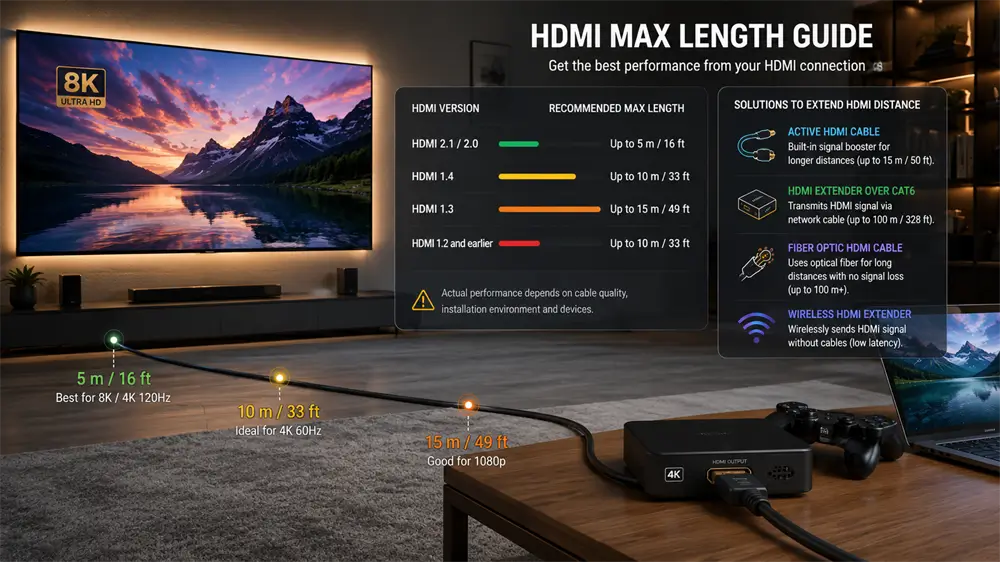
What Is the HDMI Max Length?
For a common passive copper HDMI cable, the reliable length is usually shorter as the resolution and refresh rate increase. A 1080p signal is easier to transmit than a 4K120 or 8K60 signal because it requires less bandwidth. This is why an older Full HD TV may work well with a longer cable, while a modern gaming monitor may show flickering, black screens, or unstable audio with the same cable length.
As a practical guide:
HDMI Signal Requirement | Recommended Passive Copper Length |
1080p Full HD | Up to 10–15 m |
4K30 | Around 7–10 m |
4K60 HDR | Around 3–5 m |
4K120 / 8K60 | Around 2–3 m for passive copper |
Long-distance AV installation | Use active, optical, or extender solutions |
These figures are practical recommendations, not strict official limits. In real projects, a high-quality cable may exceed these distances, while a low-quality cable may fail earlier. HDMI standards do not define one official maximum cable length; real-world limits depend heavily on cable construction and bandwidth demand.
Why HDMI Cable Length Matters
HDMI transmits digital signals, so users often assume the picture will either work perfectly or not work at all. In reality, a marginal HDMI connection can create several symptoms before complete failure. Common issues include screen flickering, intermittent black screen, sparkles or visual noise, audio dropouts, no signal warnings, wrong refresh rate detection, or failure to enable HDR.
The main reason is signal attenuation. As cable length increases, the electrical signal becomes weaker and more vulnerable to interference. Higher resolutions and refresh rates make the problem more obvious because they require more data to move through the cable at once. HDMI 2.0 supports up to 18Gbps bandwidth for common 4K60 use, while HDMI 2.1 increases bandwidth up to 48Gbps for advanced features such as 4K120 and 8K60.
Passive vs. Active HDMI Cables
A passive HDMI cable is the most common type. It has no internal signal booster and works best for short-distance connections, such as connecting a laptop to a monitor or a game console to a nearby TV. Passive cables are affordable, simple, and reliable when the distance is short.
An active HDMI cable includes built-in electronics to strengthen the signal. It is suitable for medium-distance installations, such as projectors mounted across a room or conference displays placed far from a computer. Many active HDMI cables are directional, meaning one end must connect to the source and the other to the display. Reversing the cable may result in no signal.
A fiber optic HDMI cable, also known as an active optical HDMI cable, converts electrical signals into optical signals. This makes it much better for long-distance transmission because optical signals resist electromagnetic interference and maintain quality over longer runs. In professional AV installations, active optical HDMI cables can reach tens of meters or even longer, depending on product design and certification.
HDMI 2.1 and HDMI 2.2: Does Length Become Shorter?
As HDMI technology improves, bandwidth requirements increase. This usually makes passive copper cable distance shorter, not longer. HDMI 2.1 introduced the Ultra High Speed HDMI Cable category, designed to support up to 48Gbps and features such as uncompressed 8K60 and 4K120.
HDMI 2.2 raises the performance ceiling further. The HDMI Forum released HDMI 2.2 with support for up to 96Gbps through the new Ultra96 HDMI Cable, and products using the Ultra96 feature name require Ultra96 HDMI Cable support for maximum bandwidth. This means cable quality and certification will become even more important for high-end displays, gaming systems, VR/AR equipment, and professional AV systems.
For consumers, the key point is simple: do not choose a cable only by the printed “HDMI version.” Choose by certified cable type, bandwidth, length, and actual use case.
How to Extend HDMI Beyond Normal Limits
For longer HDMI runs, several solutions are available.
1. Active HDMI cable
Best for medium-distance home theater or meeting room setups. It is cleaner than using several adapters and reduces signal loss compared with a passive cable.
2. Fiber optic HDMI cable
Best for long runs, high-resolution projectors, digital signage, churches, lecture halls, and large conference rooms. It is usually thinner, lighter, and more resistant to interference than copper.
3. HDMI extender over Cat6 cable
An HDMI extender uses a transmitter and receiver to send HDMI over a network cable. This is useful when the cable must pass through walls, ceilings, or structured cabling systems.
4. Wireless HDMI extender
This works well when cabling is difficult, especially for presentations, temporary displays, or flexible classroom setups. However, wireless performance depends on distance, obstacles, and interference.
How to Choose the Right HDMI Cable Length
For short desktop or TV setups, choose the shortest certified HDMI cable that fits the installation. A 1–3 m cable is ideal for laptops, monitors, game consoles, and TV boxes.
For a 4K home theater, a high-quality 3–5 m HDMI cable is usually safe. For 4K120 gaming or 8K setups, prioritize Ultra High Speed HDMI certification and avoid unnecessary length.
For projectors, conference rooms, and commercial displays, plan the cable path before purchasing. If the required distance exceeds 5–10 m, active HDMI or fiber HDMI is usually the safer choice.
For in-wall installation, choose durable, certified, and properly rated cable. Replacing a hidden HDMI cable later can be costly, so it is better to install a higher-quality solution from the beginning.
Endnote
A stable HDMI connection depends on matching the cable to the signal requirement. For modern 4K, 8K, gaming and professional display systems, cable bandwidth, certification, shielding, and build quality matter as much as length. VCOM recommends selecting HDMI cables and extension solutions based on actual resolution, refresh rate, installation distance, and device compatibility rather than simply choosing the longest cable available.
Tag:HDMI,cable


Related Products
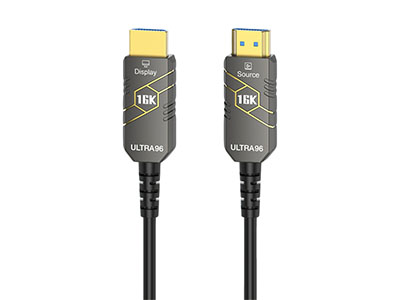 | |
| HDMI 2.2 Active Optical Cable | |
 |  |
