
Thin HDMI cables have become increasingly popular as TVs, monitors, laptops, gaming consoles, and media players move toward cleaner and more compact installation environments. A modern living room may use a wall-mounted TV with almost no rear clearance. A gaming desk may need several devices connected in a narrow cable channel. A conference room may require hidden wiring that looks professional from every angle.
This raises a practical question: are thin HDMI cables worth buying, or do they sacrifice signal quality for appearance?
The answer is yes, thin HDMI cables are worth buying when the cable is properly designed for the required resolution, refresh rate, and installation distance. A slim cable should not be judged only by its diameter. The real value depends on bandwidth, shielding, conductor structure, connector design, and whether the cable fits the actual application.
What Is a Thin HDMI Cable?
A thin HDMI cable, often called a slim HDMI cable or ultra-thin HDMI cable, uses a smaller outer diameter than a conventional HDMI cable. Standard HDMI cables can feel stiff, especially near the connector. Thin HDMI cables are designed to improve flexibility, reduce bending pressure, and make routing easier in tight spaces.
This does not mean every thin HDMI cable is automatically high quality. HDMI signals, especially 4K and 8K signals, demand stable high-speed transmission. If the cable is made with poor shielding or weak internal conductors, users may experience flickering, black screens, audio dropouts, or failure to reach the advertised resolution.
A well-built thin HDMI cable solves this problem through better engineering. Coaxial internal structures, multi-layer shielding, precise connectors, and short optimized lengths help maintain signal integrity while keeping the cable slim and flexible.
Why Thin HDMI Cables Are Useful
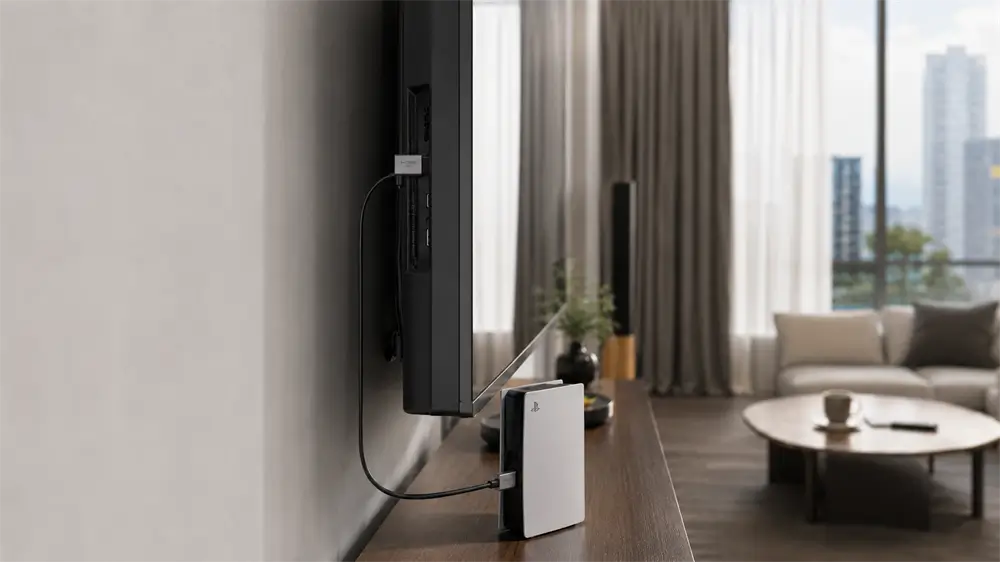
The biggest advantage of a thin HDMI cable is easier installation. Behind a wall-mounted TV, the space between the display and the wall bracket can be very limited. A thick cable may bend sharply, press against the wall, or place stress on the HDMI port. Over time, this pressure can loosen the port or make the connection unstable.
Thin HDMI cables are also useful for compact gaming setups. PlayStation, Xbox, mini PCs, streaming boxes, laptops, and monitors often sit close together on a desk or inside a media cabinet. A flexible HDMI cable is easier to route cleanly without forcing the device to move or creating messy cable loops.
Professional AV installers also benefit from thin HDMI cables. In meeting rooms, classrooms, retail displays, and exhibition booths, cable appearance matters. A slim cable helps keep the installation neat while making maintenance easier when devices need to be replaced or repositioned.
Another overlooked benefit is reduced connector strain. HDMI ports are not designed to carry the weight of a stiff cable hanging at an awkward angle. A lighter, more flexible cable can help protect the port, especially on thin TVs, portable monitors, and laptops.
Can Thin HDMI Cables Support 4K and 8K?
Thin HDMI cables can support 4K and 8K, but only if their specifications are suitable. For many 4K@60Hz applications, an HDMI cable with 18Gbps bandwidth may be enough. For more demanding setups, such as 4K@120Hz gaming, 8K@60Hz video, HDR, VRR, ALLM, or eARC, a 48Gbps HDMI 2.1-class cable is the more appropriate choice.
The important point is that picture quality is not improved by buying a thicker cable. HDMI transmits digital signals. If the cable has enough bandwidth and signal integrity, the image and audio will be transmitted correctly. If it does not, the result is usually obvious: no signal, intermittent signal loss, screen flashing, or limited display settings.
VCOM CG582RC: A Practical Thin HDMI Cable Option
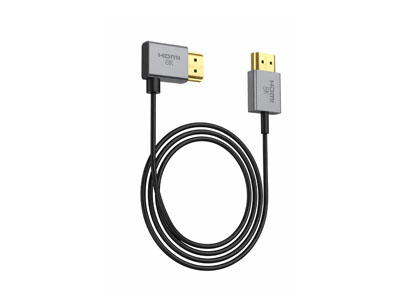
For users looking for a slim HDMI cable designed around modern high-resolution devices, the VCOM CG582RC is a strong option. It is an ultra-thin HDMI 2.1 left-angle coaxial cable built for wall-mounted displays, home theater systems, professional AV integration, and compact setups for gaming consoles, media players, and laptops.
Its 2.5mm outer diameter makes it much easier to route in narrow spaces than many conventional HDMI cables. The left-angle HDMI connector is particularly useful behind wall-mounted TVs or monitors, where a straight connector may press against the wall and increase port strain.
From a performance perspective, the CG582RC supports up to 48Gbps bandwidth and video output up to 8K@60Hz. Its 8 coaxial plus 6 signal core structure helps maintain stable high-speed transmission, while individual shielding and overall braided shielding help reduce interference. Gold-plated contacts and an ultra-flexible PVC jacket further improve durability and usability.
For users building a clean 4K or 8K entertainment setup, or installers working with limited rear clearance, this type of cable offers a balanced combination of flexibility, performance, and professional cable management.
FAQ: Are Thin HDMI Cables Worth Buying?
1. Do thin HDMI cables affect picture quality?
A thin HDMI cable does not reduce picture quality if it is properly designed. HDMI carries a digital signal, so the cable either transmits the signal correctly or shows obvious problems such as flickering, black screens, signal drops, or limited resolution options. The key is to choose a thin HDMI cable with the right bandwidth and shielding.
2. Are thin HDMI cables good for gaming?
Thin HDMI cables can be excellent for gaming if they support the required refresh rate and HDMI features. For PlayStation 5, Xbox Series X, gaming PCs, and high-refresh monitors, buyers should look for support for 4K@120Hz, VRR, ALLM, HDR, and 48Gbps bandwidth.
3. Are thin HDMI cables good for wall-mounted TVs?
Yes. Wall-mounted TVs are one of the best use cases for thin HDMI cables. Their slim and flexible design makes them easier to route behind the display, especially when the TV sits close to the wall. A left-angle or right-angle connector can further reduce bending pressure and protect the HDMI port.
4. What is the difference between a thin HDMI cable and a standard HDMI cable?
The main difference is physical design. A thin HDMI cable has a smaller outer diameter and better flexibility, making it easier to install in tight spaces. A standard HDMI cable is usually thicker and may offer stronger physical protection, but it can be harder to bend and manage in compact setups. Performance depends on bandwidth and construction, not thickness alone.
5. Are thin HDMI cables less durable?
Not always. A high-quality thin HDMI cable can be durable if it uses strong connectors, proper shielding, reliable internal conductors, and a flexible jacket. However, very cheap thin HDMI cables may reduce material quality to achieve a smaller size, which can lead to unstable signals or shorter service life.
6. How long can a thin HDMI cable be?
Thin passive HDMI cables are generally best for shorter distances, especially when carrying 4K or 8K signals. For longer cable runs across rooms, ceilings, or commercial installations, an active optical HDMI cable may be a better choice because it maintains signal stability over longer distances.
7. Is an ultra-thin HDMI 2.1 cable better than a regular HDMI cable?
It depends on the application. An ultra-thin HDMI 2.1 cable is better for clean, compact, and high-performance setups where flexibility is important. A regular HDMI cable may still be suitable for basic 1080p or 4K installations where space is not limited. The better choice is the cable that matches the display, device, and installation environment.
Tag:Thin HDMI Cable


Related Products
 | |
| Ultra-Thin HDMI 2.1 Cable | |
 |  |
