
Connecting a laptop to a TV is not really a cable question. It is a port-and-signal question. The correct solution depends on the video output available on the laptop and the input accepted by the TV. In most cases, HDMI remains the simplest answer because it was built for mainstream display and consumer electronics connectivity. But it is not the only answer. DisplayPort, Mini DisplayPort, USB-C, and Thunderbolt-based video output can also play a role, especially on business laptops and performance-oriented PCs.
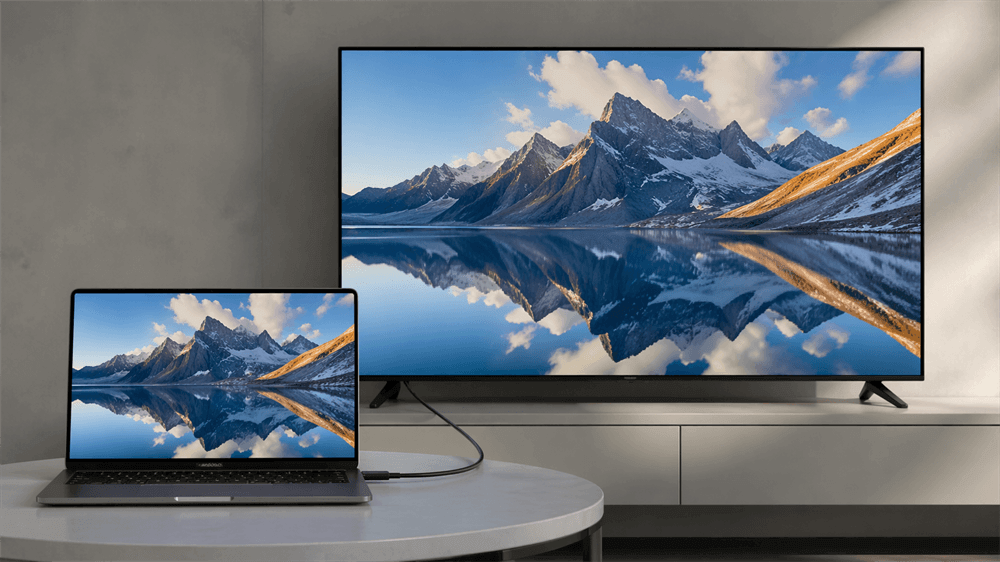
HDMI Is Still the Default Choice for Most TVs
When both the laptop and the TV have HDMI ports, HDMI-to-HDMI is still the cleanest and most reliable solution. HDMI Licensing notes that HDMI cable types and certification programs are designed around specific performance levels, which is why HDMI remains the mainstream choice for everyday display connections such as streaming, presentations, and general extended-screen use.
The reason is straightforward. HDMI is native to the TV ecosystem. It carries video and audio together, is widely supported across consumer displays, and usually requires very little setup beyond selecting the correct input on the TV. For most users asking which cable connects a laptop to a TV, HDMI is still the first answer worth checking.
DisplayPort and Mini DisplayPort Still Matter
A serious buying decision should not ignore DisplayPort. VESA describes DisplayPort as a scalable digital display interface designed for high-performance connectivity, with support for high resolutions, fast refresh rates, and deep color depth over standard cables. That is why DisplayPort remains common on business laptops, docking stations, graphics cards, and performance-focused PCs.
This matters because many laptops output video through full-size DisplayPort or Mini DisplayPort, while most TVs still expect HDMI. In that situation, a DP-to-HDMI or Mini DP-to-HDMI cable or adapter is often the correct traditional wired solution. VESA also states that simple adapters allow DisplayPort-enabled devices to connect to displays using older or alternate interfaces such as HDMI, DVI, and VGA, which makes DisplayPort especially useful in mixed environments.
In practical terms, HDMI is more common on the display side of a TV setup, while DisplayPort is more common on the source side of professional or higher-performance computing equipment.
USB-C: When the Port Supports Video Output
USB-C makes modern laptops thinner and more versatile, but it also creates confusion. A USB-C connector does not automatically mean the port can send video to a TV. DisplayPort Alt Mode allows a USB Type-C connector and cable to deliver full DisplayPort audio/video performance, and this mode can also drive adapters for HDMI, DVI, and VGA displays.
That detail is critical. A USB-C cable may charge a laptop perfectly and still fail as a display cable if the laptop does not support video output on that port. USB-IF materials describing the DP Alt Mode ecosystem likewise show certified USB-C protocol converters for HDMI, VGA, and DVI, reinforcing the same point: the connector shape alone does not guarantee display capability.
The practical rule is simple. When a laptop has only USB-C, confirm DisplayPort Alt Mode or an equivalent display-capable implementation before buying a USB-C-to-HDMI solution. Without that support, the connection may carry power and data but still produce no image on the TV.
Legacy Options Still Appear in Real Installations
Older conference rooms, classrooms, and retrofit office spaces still use VGA or DVI. Those standards are no longer ideal, but they have not disappeared. DisplayPort-enabled devices can connect to monitors and projectors using older technologies such as HDMI, DVI, and VGA through adapters, which is one reason DP-based laptops remain flexible in transitional AV environments.
For image quality and long-term compatibility, HDMI and DisplayPort remain the stronger wired choices. VGA should be treated mainly as a legacy compatibility path rather than a preferred modern solution. Still, in the real world, legacy interfaces continue to matter because many installations are upgraded gradually rather than replaced all at once.
Wired Connections Are Not Always the Best Operational Choice
A wired connection is usually the best option when signal stability, low latency, and predictable performance matter most. That is why HDMI and DisplayPort remain the standard recommendation for fixed desks, dedicated meeting rooms, and permanent AV installations.
But a technically correct cable is not always the best operational solution. A wall-mounted TV, a long conference table, a shared meeting room, or a clean desktop environment can quickly turn a simple wired connection into a messy one. In those settings, convenience, mobility, and setup speed become just as important as pure signal transport.
VCOM DD543 Offers a Cleaner Alternative When Cables Get in the Way
VCOM DD543 addresses a very specific modern use case: the source device is increasingly USB-C, the display is still usually HDMI, and running a physical cable across the room is inconvenient. DD543 uses a USB-C transmitter on the source side and an HDMI receiver on the display side. It supports up to 3840 × 2160 at 30Hz, works over 5G Wi-Fi (802.11ac), supports replication and extension modes, and is compatible with Windows, macOS, and Android.
Its design solves more than one problem at once. It removes the need for a long HDMI cable, reduces dependence on room layout, and keeps the TV side compatible with the HDMI input most displays already use. DD543 does not require an external network, which gives it a practical advantage in meeting rooms, classrooms, temporary installations, and BYOD environments where traditional network-based casting can be unreliable or difficult to manage.
PD3.0 100W pass-through charging, a maximum transmission range of 100 ft / 30 m obstacle-free and 50 ft / 15 m with obstacles or interference, plus plug-and-play operation. That makes DD543 a sensible wireless alternative when flexibility and deployment speed matter more than maintaining a permanent wired run.
Endnote
The best answer to “Which cable can connect a laptop to a TV?” is not one cable for every case. HDMI remains the default and most widely practical solution for TVs. DisplayPort and Mini DisplayPort remain important traditional wired options, especially on business and performance-oriented laptops. USB-C works well only when the laptop actually supports video output. And when a cable becomes a limitation rather than a convenience, VCOM DD543 offers a practical wireless path built around today’s USB-C source devices and HDMI display environments.
Tag:HDMI,TV


