As home theaters, gaming setups, conference rooms, classrooms, and digital signage systems move toward higher resolution and higher refresh rates, the HDMI cable is no longer just a simple accessory. It has become a critical part of the signal chain. A display may support 4K, 8K, HDR, eARC, or 120Hz gaming, but the experience still depends on whether the cable can transmit the signal stably.
For short-distance connections, traditional copper HDMI cables remain a practical and cost-effective choice. However, when the cable needs to run across a room, through a wall, above a ceiling, or from an AV rack to a projector, copper HDMI can face signal attenuation, electromagnetic interference, and installation difficulty. This is where an HDMI fiber optic cable becomes a better solution.
What Is an HDMI Fiber Optic Cable?
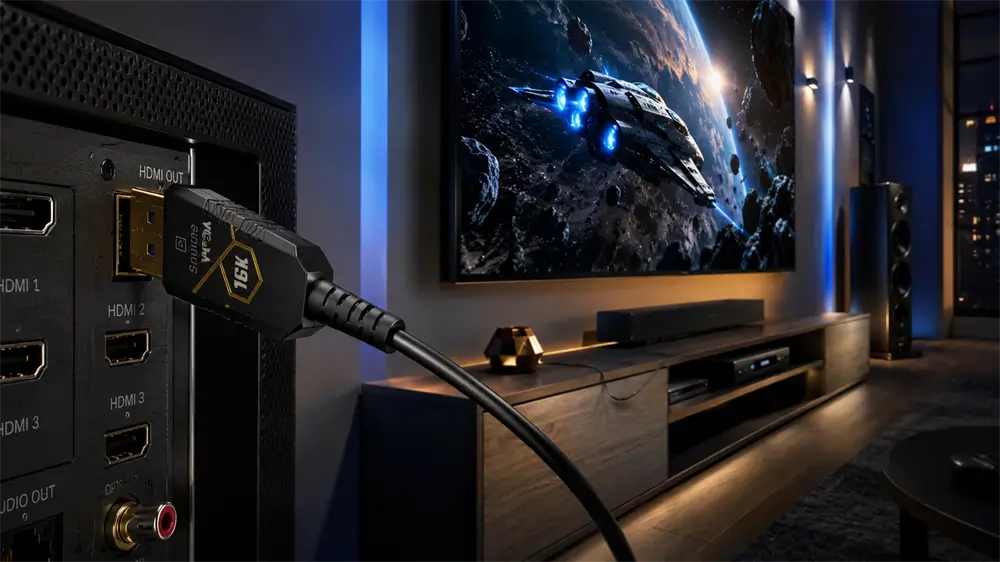
An HDMI fiber optic cable, also known as an active optical HDMI cable or HDMI AOC, is a cable that uses optical fiber to transmit high-speed audio and video signals. It keeps the familiar HDMI connector shape, so users can still connect devices such as laptops, Blu-ray players, game consoles, AV receivers, projectors, monitors, and TVs in the usual way.
The key difference is inside the cable. Instead of relying only on copper conductors, an HDMI fiber optic cable converts electrical HDMI signals into optical signals, transmits them through fiber, and then converts them back into electrical signals at the display end. Many HDMI AOC products use a hybrid design: optical fiber handles high-speed signal transmission, while copper conductors may support power, control signals, or low-speed communication.
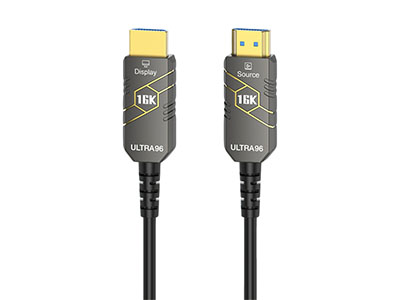
Because active chips are built into the connector heads, most HDMI fiber optic cables are directional. One end is marked “Source,” and the other is marked “Display.” The Source end connects to the signal output device, while the Display end connects to the TV, monitor, or projector.
How Does a Fiber Optic HDMI Cable Work?
The working principle is simple but highly effective. When the HDMI source sends a signal, the active chipset inside the cable converts the electrical signal into light. The optical fiber carries this light signal over a long distance with very low loss. At the other end, another chipset converts the light signal back into an HDMI electrical signal that the display can understand.
This light-based transmission gives fiber optic HDMI cables several advantages. Optical fiber is less affected by electromagnetic interference, which is useful in environments with power cables, network equipment, LED displays, speakers, or industrial devices nearby. It also enables longer cable runs while maintaining better signal stability than many passive copper cables.
HDMI Fiber Optic Cable vs. Copper HDMI Cable
The best cable choice depends on distance, resolution, refresh rate, installation environment, and budget.
Copper HDMI cables are excellent for short runs, especially from a laptop to a monitor, a game console to a TV, or a media player to an AV receiver. They are affordable, widely available, and suitable for many daily applications.
HDMI fiber optic cables are designed for more demanding conditions. They are especially useful when the cable length exceeds what a passive copper cable can reliably handle. They are also thinner and lighter than many long copper HDMI cables, making them easier to route through conduits, walls, ceilings, and AV cabinets.
For performance, the key is not just whether the cable is copper or fiber, but whether it supports the required bandwidth. A 4K@60Hz display may only require an HDMI 2.0-level cable, while 4K@120Hz, 8K@60Hz, VRR, ALLM, and eARC applications generally require Ultra High Speed HDMI capability. As HDMI 2.2 develops, higher-bandwidth applications will require even stricter cable quality and certification.
When Should an HDMI Fiber Optic Cable Be Used?
An HDMI fiber optic cable is recommended when long-distance transmission and stable high-resolution output are required. Common use cases include ceiling-mounted projectors, home theater wiring, 4K/8K TVs installed far from the source device, conference room displays, classroom AV systems, hotel digital signage, exhibition screens, control rooms, and broadcast environments.
Gamers may also benefit from HDMI fiber optic cables when a gaming PC or console is installed away from the display. For example, a clean gaming room may place the console or PC inside a cabinet while the display is wall-mounted several meters away. In this case, a high-quality HDMI 2.1 fiber optic cable can help maintain 4K@120Hz performance without visible flicker, black screens, or unstable handshakes.
Key Specifications to Check Before Buying
The first specification to check is bandwidth. For 4K@60Hz, many HDMI 2.0-rated cables are sufficient. For 4K@120Hz, 8K@60Hz, HDR gaming, VRR, and eARC, an Ultra High Speed HDMI cable is the safer choice. For future HDMI 2.2 applications, Ultra96 HDMI cables will become important as devices adopt higher bandwidth requirements.
The second factor is cable length. Longer is not always better. The best practice is to choose a cable length that fits the installation path with a small margin, but without excessive slack. Overly long cables create unnecessary routing difficulty and may increase the risk of bending or connector stress.
The third factor is direction. Since most HDMI fiber optic cables are directional, the Source and Display markings must be checked before installation. This is especially important for in-wall or ceiling projects, where reversing the cable after installation can be costly and time-consuming.
Build quality also matters. A good HDMI fiber optic cable should have durable connectors, a stable chipset, strong strain relief, a reasonable bend radius, and reliable jacket material. For professional installation, in-wall or plenum-rated cable may be required according to local building standards.
Common Problems and Installation Tips
The most common problem with HDMI fiber optic cables is no signal after installation. The first step is to check whether the cable direction is correct. The Source end must be connected to the output device, and the Display end must be connected to the screen.
If the screen flickers or turns black, the full signal chain should be checked. The source device, cable, adapter, AV receiver, and display must all support the same resolution and refresh rate. A cable that supports 8K cannot make an older display output 8K, and an HDMI 2.1 display will not perform at full capability if the source device only supports HDMI 2.0.
Before running a cable through a wall or ceiling, test it with the actual source and display. This simple step can prevent expensive rework. During installation, avoid tight bends, heavy pulling, crushed cable sections, and unsupported connector weight.
Why Choose VCOM HDMI Fiber Optic Cable?
VCOM provides connectivity products for home, office, education, and professional AV environments, including HDMI cables, adapters, converters, hubs, docking stations, and display accessories. For long-distance HDMI transmission, VCOM HDMI fiber optic cable is suitable for users who need stable 4K or 8K signal delivery across a clean and reliable installation path.
FAQ
Is an HDMI fiber optic cable better than a regular HDMI?
It is better for long-distance and interference-sensitive installations. For short distances, a high-quality copper HDMI cable may still be enough.
Can an HDMI fiber optic cable support 4K or 8K?
Yes, but the cable, source device, and display must all support the required bandwidth and HDMI features.
Are HDMI fiber optic cables directional?
Most are directional. Always connect the Source end to the signal output device and the Display end to the screen.
Does fiber optic HDMI need extra power?
Many models draw power from the HDMI port. Some designs may require auxiliary USB power, depending on cable length and chipset design.
Tag:Fiber Optic Cable


Related Products
 | |
| HDMI 2.2 Active Optical Cable | |
 |  |